
Command Mode
Background collage: dimmed windows show Command Mode at work (an empty note in which a poem about flowers at dawn appears on request, a chat where the key facts about Cologne Cathedral land straight in the input field, an email in which a paragraph typed in anger is replaced by a calm, factual version, a card showing the two routes with and without a selection, a card with a short decline, a Slack reply on request, a card about the selected passage being the only thing replaced, a cancel card with the Esc key, a card about the apps this works in, and a card about the built-in Perplexity search for research questions). In the middle sits a text field with the WhispaWave speech pill below: the pill wakes up, the headline “Double-tap Fn and say it. The text lands where your cursor is.” types itself into the field once and stays; below it, three explainer paragraphs rotate in the pill’s rhythm. With the first paragraph, the “Download for macOS” button appears and stays.
 Slack · Nachricht
„fass den stand für das team zusammen"
Kurzer Stand: Freigaben liegen beim Kunden, Liefertermin hält, sobald sie da sind.
„schreib das formeller und höflicher"
Geht nicht, machen wir nicht.
Das lässt sich in dieser Form leider nicht umsetzen. Ich schlage Ihnen gern eine Alternative vor.
 Mail · Antwort
„schreib das ruhig, ich will nicht eskalieren"
Diese Darstellung ist falsch, und das wissen Sie genau.
Dass der Termin wackelt, ärgert mich genauso wie Sie.
bricht ab, solange nichts eingefügt ist
Der Rest des Textes bleibt unangetastet.
Sehr geehrte Frau Schöllgen,
Wir dürfen Sie höflich darum ersuchen …
Viele Grüße, Anna Weber
Kein Chat-Fenster, kein Copy-Paste.
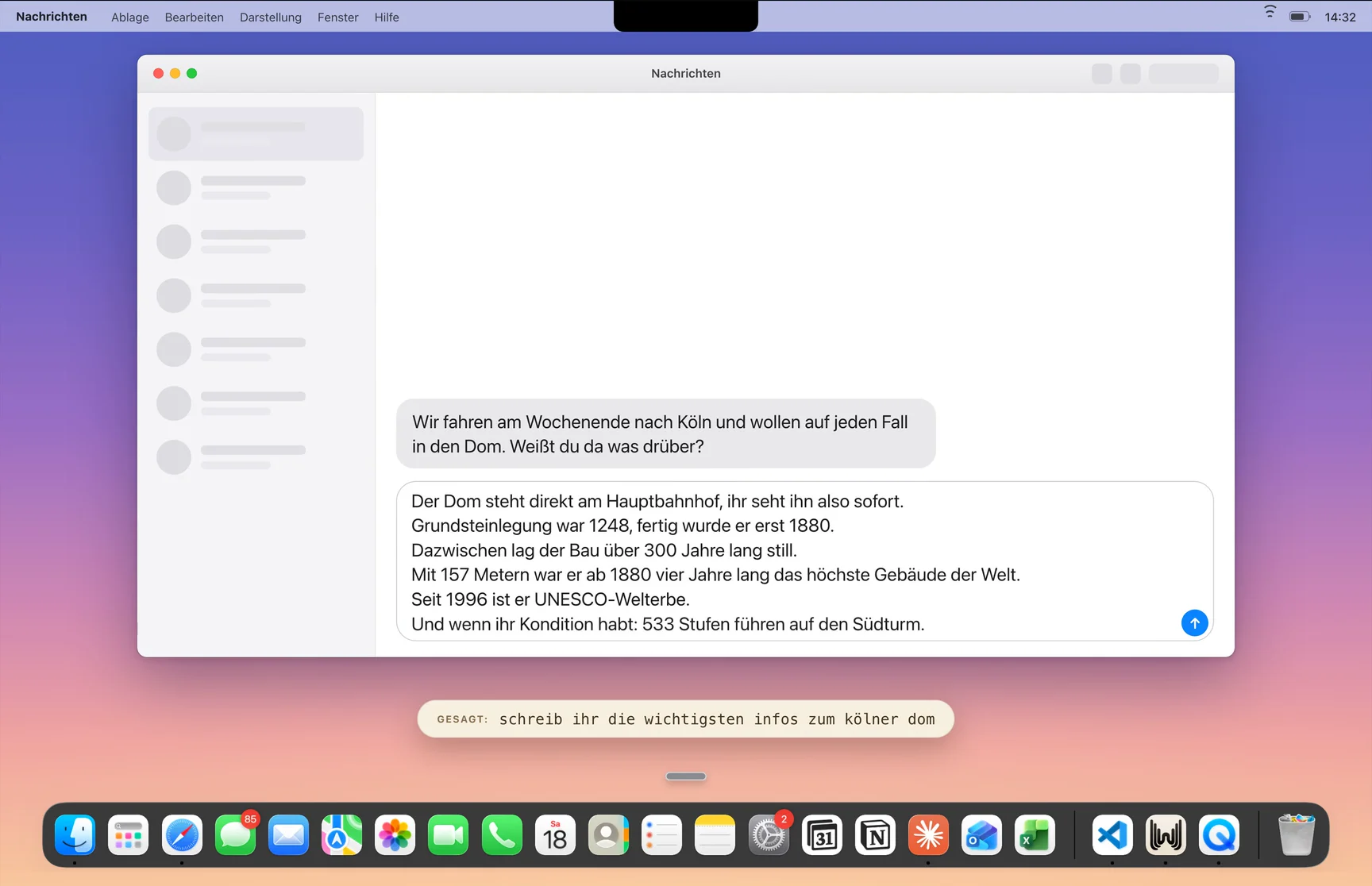
„schreib ihr die wichtigsten infos zum kölner dom"
Grundsteinlegung war 1248, fertig wurde er erst 1880.
Seit 1996 ist er UNESCO-Welterbe.

„schreib mir ein gedicht über blumen in der morgenröte"
Noch hängt die Nacht in kalten Zweigen,
der Tau steht schwer auf jedem Blatt.
zweimal drücken, dann sagen, was passieren soll
Ohne Markierung: neuer Text an der Cursor-Stelle.
Mit Markierung: genau diese Stelle wird ersetzt.
Fragen ohne Textziel gehen an die eingebettete Perplexity-Suche.
ohne Programm-Wechsel
„schreib eine kurze absage für donnerstag"
Danke für die Einladung. Den Termin am Donnerstag schaffe ich leider nicht.
Slack · Nachricht„fass den stand für das team zusammen"
Kurzer Stand: Freigaben liegen beim Kunden, Liefertermin hält, sobald sie da sind.
„schreib das formeller und höflicher"
Geht nicht, machen wir nicht.
Das lässt sich in dieser Form leider nicht umsetzen. Ich schlage Ihnen gern eine Alternative vor.
Mail · Antwort„schreib das ruhig, ich will nicht eskalieren"
Diese Darstellung ist falsch, und das wissen Sie genau.
Dass der Termin wackelt, ärgert mich genauso wie Sie.
bricht ab, solange nichts eingefügt ist
Der Rest des Textes bleibt unangetastet.
Sehr geehrte Frau Schöllgen,
Wir dürfen Sie höflich darum ersuchen …
Viele Grüße, Anna Weber
Kein Chat-Fenster, kein Copy-Paste.
„schreib ihr die wichtigsten infos zum kölner dom"
Grundsteinlegung war 1248, fertig wurde er erst 1880.
Seit 1996 ist er UNESCO-Welterbe.
„schreib mir ein gedicht über blumen in der morgenröte"
Noch hängt die Nacht in kalten Zweigen,
der Tau steht schwer auf jedem Blatt.
zweimal drücken, dann sagen, was passieren soll
Ohne Markierung: neuer Text an der Cursor-Stelle.
Mit Markierung: genau diese Stelle wird ersetzt.
Fragen ohne Textziel gehen an die eingebettete Perplexity-Suche.
ohne Programm-Wechsel
„schreib eine kurze absage für donnerstag"
Danke für die Einladung. Den Termin am Donnerstag schaffe ich leider nicht.
„schreib ihr die wichtigsten infos zum kölner dom"
Grundsteinlegung war 1248, fertig wurde er erst 1880.
Seit 1996 ist er UNESCO-Welterbe.
Sehr geehrte Frau Schöllgen,
Wir dürfen Sie höflich darum ersuchen …
Viele Grüße, Anna Weber
Kein Chat-Fenster, kein Copy-Paste.
„schreib mir ein gedicht über blumen in der morgenröte"
Noch hängt die Nacht in kalten Zweigen,
der Tau steht schwer auf jedem Blatt.
Fragen ohne Textziel gehen an die eingebettete Perplexity-Suche.
ohne Programm-Wechsel
„schreib eine kurze absage für donnerstag"
Danke für die Einladung. Den Termin am Donnerstag schaffe ich leider nicht.
zweimal drücken, dann sagen, was passieren soll
Ohne Markierung: neuer Text an der Cursor-Stelle.
Mit Markierung: genau diese Stelle wird ersetzt.
Mail · Antwort„schreib das ruhig, ich will nicht eskalieren"
Diese Darstellung ist falsch, und das wissen Sie genau.
Dass der Termin wackelt, ärgert mich genauso wie Sie.
„schreib das formeller und höflicher"
Geht nicht, machen wir nicht.
Das lässt sich in dieser Form leider nicht umsetzen. Ich schlage Ihnen gern eine Alternative vor.
Slack · Nachricht„fass den stand für das team zusammen"
Kurzer Stand: Freigaben liegen beim Kunden, Liefertermin hält, sobald sie da sind.
Standard
Das Kürzel selbst ist frei belegbar.
„schreib ihr die wichtigsten infos zum kölner dom"
Grundsteinlegung war 1248, fertig wurde er erst 1880.
Seit 1996 ist er UNESCO-Welterbe.
Sehr geehrte Frau Schöllgen,
Wir dürfen Sie höflich darum ersuchen …
Viele Grüße, Anna Weber
Kein Chat-Fenster, kein Copy-Paste.
„schreib mir ein gedicht über blumen in der morgenröte"
Noch hängt die Nacht in kalten Zweigen,
der Tau steht schwer auf jedem Blatt.
Fragen ohne Textziel gehen an die eingebettete Perplexity-Suche.
ohne Programm-Wechsel
„schreib eine kurze absage für donnerstag"
Danke für die Einladung. Den Termin am Donnerstag schaffe ich leider nicht.
zweimal drücken, dann sagen, was passieren soll
Ohne Markierung: neuer Text an der Cursor-Stelle.
Mit Markierung: genau diese Stelle wird ersetzt.
Mail · Antwort„schreib das ruhig, ich will nicht eskalieren"
Diese Darstellung ist falsch, und das wissen Sie genau.
Dass der Termin wackelt, ärgert mich genauso wie Sie.
„schreib das formeller und höflicher"
Geht nicht, machen wir nicht.
Das lässt sich in dieser Form leider nicht umsetzen. Ich schlage Ihnen gern eine Alternative vor.
Slack · Nachricht„fass den stand für das team zusammen"
Kurzer Stand: Freigaben liegen beim Kunden, Liefertermin hält, sobald sie da sind.
Standard
Das Kürzel selbst ist frei belegbar.
Standard
Das Kürzel selbst ist frei belegbar.
Kein Chat-Fenster, kein Copy-Paste.
„schreib mir ein gedicht über blumen in der morgenröte"
Noch hängt die Nacht in kalten Zweigen,
der Tau steht schwer auf jedem Blatt.
zweimal drücken, dann sagen, was passieren soll
Ohne Markierung: neuer Text an der Cursor-Stelle.
Mit Markierung: genau diese Stelle wird ersetzt.
„schreib eine kurze absage für donnerstag"
Danke für die Einladung. Den Termin am Donnerstag schaffe ich leider nicht.
„schreib das formeller und höflicher"
Geht nicht, machen wir nicht.
Das lässt sich in dieser Form leider nicht umsetzen. Ich schlage Ihnen gern eine Alternative vor.
Slack · Nachricht„fass den stand für das team zusammen"
Kurzer Stand: Freigaben liegen beim Kunden, Liefertermin hält, sobald sie da sind.
Mail · Antwort„schreib das ruhig, ich will nicht eskalieren"
Diese Darstellung ist falsch, und das wissen Sie genau.
Dass der Termin wackelt, ärgert mich genauso wie Sie.
bricht ab, solange nichts eingefügt ist
Der Rest des Textes bleibt unangetastet.
Fragen ohne Textziel gehen an die eingebettete Perplexity-Suche.
ohne Programm-Wechsel
Sehr geehrte Frau Schöllgen,
Wir dürfen Sie höflich darum ersuchen …
Viele Grüße, Anna Weber
Standard
Das Kürzel selbst ist frei belegbar.
Kein Chat-Fenster, kein Copy-Paste.
„schreib mir ein gedicht über blumen in der morgenröte"
Noch hängt die Nacht in kalten Zweigen,
der Tau steht schwer auf jedem Blatt.
zweimal drücken, dann sagen, was passieren soll
Ohne Markierung: neuer Text an der Cursor-Stelle.
Mit Markierung: genau diese Stelle wird ersetzt.
„schreib eine kurze absage für donnerstag"
Danke für die Einladung. Den Termin am Donnerstag schaffe ich leider nicht.
„schreib das formeller und höflicher"
Geht nicht, machen wir nicht.
Das lässt sich in dieser Form leider nicht umsetzen. Ich schlage Ihnen gern eine Alternative vor.
Slack · Nachricht„fass den stand für das team zusammen"
Kurzer Stand: Freigaben liegen beim Kunden, Liefertermin hält, sobald sie da sind.
Mail · Antwort„schreib das ruhig, ich will nicht eskalieren"
Diese Darstellung ist falsch, und das wissen Sie genau.
Dass der Termin wackelt, ärgert mich genauso wie Sie.
bricht ab, solange nichts eingefügt ist
Der Rest des Textes bleibt unangetastet.
Fragen ohne Textziel gehen an die eingebettete Perplexity-Suche.
ohne Programm-Wechsel
Sehr geehrte Frau Schöllgen,
Wir dürfen Sie höflich darum ersuchen …
Viele Grüße, Anna Weber
Slack · Nachricht„fass den stand für das team zusammen"
Kurzer Stand: Freigaben liegen beim Kunden, Liefertermin hält, sobald sie da sind.
Mail · Antwort„schreib das ruhig, ich will nicht eskalieren"
Diese Darstellung ist falsch, und das wissen Sie genau.
Dass der Termin wackelt, ärgert mich genauso wie Sie.
„schreib mir ein gedicht über blumen in der morgenröte"
Noch hängt die Nacht in kalten Zweigen,
der Tau steht schwer auf jedem Blatt.
Sehr geehrte Frau Schöllgen,
Wir dürfen Sie höflich darum ersuchen …
Viele Grüße, Anna Weber
zweimal drücken, dann sagen, was passieren soll
Ohne Markierung: neuer Text an der Cursor-Stelle.
Mit Markierung: genau diese Stelle wird ersetzt.
„schreib das formeller und höflicher"
Geht nicht, machen wir nicht.
Das lässt sich in dieser Form leider nicht umsetzen. Ich schlage Ihnen gern eine Alternative vor.
Kein Chat-Fenster, kein Copy-Paste.
bricht ab, solange nichts eingefügt ist
Der Rest des Textes bleibt unangetastet.
Standard
Das Kürzel selbst ist frei belegbar.
Fragen ohne Textziel gehen an die eingebettete Perplexity-Suche.
ohne Programm-Wechsel
„schreib eine kurze absage für donnerstag"
Danke für die Einladung. Den Termin am Donnerstag schaffe ich leider nicht.
Slack · Nachricht„fass den stand für das team zusammen"
Kurzer Stand: Freigaben liegen beim Kunden, Liefertermin hält, sobald sie da sind.
Mail · Antwort„schreib das ruhig, ich will nicht eskalieren"
Diese Darstellung ist falsch, und das wissen Sie genau.
Dass der Termin wackelt, ärgert mich genauso wie Sie.
„schreib mir ein gedicht über blumen in der morgenröte"
Noch hängt die Nacht in kalten Zweigen,
der Tau steht schwer auf jedem Blatt.
Sehr geehrte Frau Schöllgen,
Wir dürfen Sie höflich darum ersuchen …
Viele Grüße, Anna Weber
zweimal drücken, dann sagen, was passieren soll
Ohne Markierung: neuer Text an der Cursor-Stelle.
Mit Markierung: genau diese Stelle wird ersetzt.
„schreib das formeller und höflicher"
Geht nicht, machen wir nicht.
Das lässt sich in dieser Form leider nicht umsetzen. Ich schlage Ihnen gern eine Alternative vor.
Kein Chat-Fenster, kein Copy-Paste.
bricht ab, solange nichts eingefügt ist
Der Rest des Textes bleibt unangetastet.
Standard
Das Kürzel selbst ist frei belegbar.
Fragen ohne Textziel gehen an die eingebettete Perplexity-Suche.
ohne Programm-Wechsel
„schreib eine kurze absage für donnerstag"
Danke für die Einladung. Den Termin am Donnerstag schaffe ich leider nicht.
„schreib ihr die wichtigsten infos zum kölner dom"
Grundsteinlegung war 1248, fertig wurde er erst 1880.
Seit 1996 ist er UNESCO-Welterbe.
Fragen ohne Textziel gehen an die eingebettete Perplexity-Suche.
ohne Programm-Wechsel
„schreib das formeller und höflicher"
Geht nicht, machen wir nicht.
Das lässt sich in dieser Form leider nicht umsetzen. Ich schlage Ihnen gern eine Alternative vor.
Sehr geehrte Frau Schöllgen,
Wir dürfen Sie höflich darum ersuchen …
Viele Grüße, Anna Weber
Kein Chat-Fenster, kein Copy-Paste.
„schreib eine kurze absage für donnerstag"
Danke für die Einladung. Den Termin am Donnerstag schaffe ich leider nicht.
zweimal drücken, dann sagen, was passieren soll
Ohne Markierung: neuer Text an der Cursor-Stelle.
Mit Markierung: genau diese Stelle wird ersetzt.
Slack · Nachricht„fass den stand für das team zusammen"
Kurzer Stand: Freigaben liegen beim Kunden, Liefertermin hält, sobald sie da sind.
Mail · Antwort„schreib das ruhig, ich will nicht eskalieren"
Diese Darstellung ist falsch, und das wissen Sie genau.
Dass der Termin wackelt, ärgert mich genauso wie Sie.
Standard
Das Kürzel selbst ist frei belegbar.
„schreib mir ein gedicht über blumen in der morgenröte"
Noch hängt die Nacht in kalten Zweigen,
der Tau steht schwer auf jedem Blatt.
„schreib ihr die wichtigsten infos zum kölner dom"
Grundsteinlegung war 1248, fertig wurde er erst 1880.
Seit 1996 ist er UNESCO-Welterbe.
Fragen ohne Textziel gehen an die eingebettete Perplexity-Suche.
ohne Programm-Wechsel
„schreib das formeller und höflicher"
Geht nicht, machen wir nicht.
Das lässt sich in dieser Form leider nicht umsetzen. Ich schlage Ihnen gern eine Alternative vor.
Sehr geehrte Frau Schöllgen,
Wir dürfen Sie höflich darum ersuchen …
Viele Grüße, Anna Weber
Kein Chat-Fenster, kein Copy-Paste.
„schreib eine kurze absage für donnerstag"
Danke für die Einladung. Den Termin am Donnerstag schaffe ich leider nicht.
zweimal drücken, dann sagen, was passieren soll
Ohne Markierung: neuer Text an der Cursor-Stelle.
Mit Markierung: genau diese Stelle wird ersetzt.
Slack · Nachricht„fass den stand für das team zusammen"
Kurzer Stand: Freigaben liegen beim Kunden, Liefertermin hält, sobald sie da sind.
Mail · Antwort„schreib das ruhig, ich will nicht eskalieren"
Diese Darstellung ist falsch, und das wissen Sie genau.
Dass der Termin wackelt, ärgert mich genauso wie Sie.
Standard
Das Kürzel selbst ist frei belegbar.
„schreib mir ein gedicht über blumen in der morgenröte"
Noch hängt die Nacht in kalten Zweigen,
der Tau steht schwer auf jedem Blatt.
Sehr geehrte Frau Schöllgen,
Wir dürfen Sie höflich darum ersuchen …
Viele Grüße, Anna Weber
zweimal drücken, dann sagen, was passieren soll
Ohne Markierung: neuer Text an der Cursor-Stelle.
Mit Markierung: genau diese Stelle wird ersetzt.
„schreib das formeller und höflicher"
Geht nicht, machen wir nicht.
Das lässt sich in dieser Form leider nicht umsetzen. Ich schlage Ihnen gern eine Alternative vor.
bricht ab, solange nichts eingefügt ist
Der Rest des Textes bleibt unangetastet.
„schreib mir ein gedicht über blumen in der morgenröte"
Noch hängt die Nacht in kalten Zweigen,
der Tau steht schwer auf jedem Blatt.
Mail · Antwort„schreib das ruhig, ich will nicht eskalieren"
Diese Darstellung ist falsch, und das wissen Sie genau.
Dass der Termin wackelt, ärgert mich genauso wie Sie.
Slack · Nachricht„fass den stand für das team zusammen"
Kurzer Stand: Freigaben liegen beim Kunden, Liefertermin hält, sobald sie da sind.
Fragen ohne Textziel gehen an die eingebettete Perplexity-Suche.
ohne Programm-Wechsel
„schreib ihr die wichtigsten infos zum kölner dom"
Grundsteinlegung war 1248, fertig wurde er erst 1880.
Seit 1996 ist er UNESCO-Welterbe.
Standard
Das Kürzel selbst ist frei belegbar.
Kein Chat-Fenster, kein Copy-Paste.
Sehr geehrte Frau Schöllgen,
Wir dürfen Sie höflich darum ersuchen …
Viele Grüße, Anna Weber
zweimal drücken, dann sagen, was passieren soll
Ohne Markierung: neuer Text an der Cursor-Stelle.
Mit Markierung: genau diese Stelle wird ersetzt.
„schreib das formeller und höflicher"
Geht nicht, machen wir nicht.
Das lässt sich in dieser Form leider nicht umsetzen. Ich schlage Ihnen gern eine Alternative vor.
bricht ab, solange nichts eingefügt ist
Der Rest des Textes bleibt unangetastet.
„schreib mir ein gedicht über blumen in der morgenröte"
Noch hängt die Nacht in kalten Zweigen,
der Tau steht schwer auf jedem Blatt.
Mail · Antwort„schreib das ruhig, ich will nicht eskalieren"
Diese Darstellung ist falsch, und das wissen Sie genau.
Dass der Termin wackelt, ärgert mich genauso wie Sie.
Slack · Nachricht„fass den stand für das team zusammen"
Kurzer Stand: Freigaben liegen beim Kunden, Liefertermin hält, sobald sie da sind.
Fragen ohne Textziel gehen an die eingebettete Perplexity-Suche.
ohne Programm-Wechsel
„schreib ihr die wichtigsten infos zum kölner dom"
Grundsteinlegung war 1248, fertig wurde er erst 1880.
Seit 1996 ist er UNESCO-Welterbe.
Standard
Das Kürzel selbst ist frei belegbar.
Kein Chat-Fenster, kein Copy-Paste.
„schreib das formeller und höflicher"
Geht nicht, machen wir nicht.
Das lässt sich in dieser Form leider nicht umsetzen. Ich schlage Ihnen gern eine Alternative vor.
Kein Chat-Fenster, kein Copy-Paste.
Mail · Antwort„schreib das ruhig, ich will nicht eskalieren"
Diese Darstellung ist falsch, und das wissen Sie genau.
Dass der Termin wackelt, ärgert mich genauso wie Sie.
bricht ab, solange nichts eingefügt ist
Der Rest des Textes bleibt unangetastet.
Standard
Das Kürzel selbst ist frei belegbar.
„schreib eine kurze absage für donnerstag"
Danke für die Einladung. Den Termin am Donnerstag schaffe ich leider nicht.
Fragen ohne Textziel gehen an die eingebettete Perplexity-Suche.
ohne Programm-Wechsel
„schreib ihr die wichtigsten infos zum kölner dom"
Grundsteinlegung war 1248, fertig wurde er erst 1880.
Seit 1996 ist er UNESCO-Welterbe.
Slack · Nachricht„fass den stand für das team zusammen"
Kurzer Stand: Freigaben liegen beim Kunden, Liefertermin hält, sobald sie da sind.
zweimal drücken, dann sagen, was passieren soll
Ohne Markierung: neuer Text an der Cursor-Stelle.
Mit Markierung: genau diese Stelle wird ersetzt.
„schreib mir ein gedicht über blumen in der morgenröte"
Noch hängt die Nacht in kalten Zweigen,
der Tau steht schwer auf jedem Blatt.
„schreib das formeller und höflicher"
Geht nicht, machen wir nicht.
Das lässt sich in dieser Form leider nicht umsetzen. Ich schlage Ihnen gern eine Alternative vor.
Kein Chat-Fenster, kein Copy-Paste.
Mail · Antwort„schreib das ruhig, ich will nicht eskalieren"
Diese Darstellung ist falsch, und das wissen Sie genau.
Dass der Termin wackelt, ärgert mich genauso wie Sie.
bricht ab, solange nichts eingefügt ist
Der Rest des Textes bleibt unangetastet.
Standard
Das Kürzel selbst ist frei belegbar.
„schreib eine kurze absage für donnerstag"
Danke für die Einladung. Den Termin am Donnerstag schaffe ich leider nicht.
Fragen ohne Textziel gehen an die eingebettete Perplexity-Suche.
ohne Programm-Wechsel
„schreib ihr die wichtigsten infos zum kölner dom"
Grundsteinlegung war 1248, fertig wurde er erst 1880.
Seit 1996 ist er UNESCO-Welterbe.
Slack · Nachricht„fass den stand für das team zusammen"
Kurzer Stand: Freigaben liegen beim Kunden, Liefertermin hält, sobald sie da sind.
zweimal drücken, dann sagen, was passieren soll
Ohne Markierung: neuer Text an der Cursor-Stelle.
Mit Markierung: genau diese Stelle wird ersetzt.
„schreib mir ein gedicht über blumen in der morgenröte"
Noch hängt die Nacht in kalten Zweigen,
der Tau steht schwer auf jedem Blatt.
Fragen ohne Textziel gehen an die eingebettete Perplexity-Suche.
ohne Programm-Wechsel
Standard
Das Kürzel selbst ist frei belegbar.
zweimal drücken, dann sagen, was passieren soll
Ohne Markierung: neuer Text an der Cursor-Stelle.
Mit Markierung: genau diese Stelle wird ersetzt.
Sehr geehrte Frau Schöllgen,
Wir dürfen Sie höflich darum ersuchen …
Viele Grüße, Anna Weber
Mail · Antwort„schreib das ruhig, ich will nicht eskalieren"
Diese Darstellung ist falsch, und das wissen Sie genau.
Dass der Termin wackelt, ärgert mich genauso wie Sie.
bricht ab, solange nichts eingefügt ist
Der Rest des Textes bleibt unangetastet.
Kein Chat-Fenster, kein Copy-Paste.
„schreib das formeller und höflicher"
Geht nicht, machen wir nicht.
Das lässt sich in dieser Form leider nicht umsetzen. Ich schlage Ihnen gern eine Alternative vor.
Slack · Nachricht„fass den stand für das team zusammen"
Kurzer Stand: Freigaben liegen beim Kunden, Liefertermin hält, sobald sie da sind.
„schreib eine kurze absage für donnerstag"
Danke für die Einladung. Den Termin am Donnerstag schaffe ich leider nicht.
„schreib ihr die wichtigsten infos zum kölner dom"
Grundsteinlegung war 1248, fertig wurde er erst 1880.
Seit 1996 ist er UNESCO-Welterbe.
Fragen ohne Textziel gehen an die eingebettete Perplexity-Suche.
ohne Programm-Wechsel
Standard
Das Kürzel selbst ist frei belegbar.
zweimal drücken, dann sagen, was passieren soll
Ohne Markierung: neuer Text an der Cursor-Stelle.
Mit Markierung: genau diese Stelle wird ersetzt.
Sehr geehrte Frau Schöllgen,
Wir dürfen Sie höflich darum ersuchen …
Viele Grüße, Anna Weber
Mail · Antwort„schreib das ruhig, ich will nicht eskalieren"
Diese Darstellung ist falsch, und das wissen Sie genau.
Dass der Termin wackelt, ärgert mich genauso wie Sie.
bricht ab, solange nichts eingefügt ist
Der Rest des Textes bleibt unangetastet.
Kein Chat-Fenster, kein Copy-Paste.
„schreib das formeller und höflicher"
Geht nicht, machen wir nicht.
Das lässt sich in dieser Form leider nicht umsetzen. Ich schlage Ihnen gern eine Alternative vor.
Slack · Nachricht„fass den stand für das team zusammen"
Kurzer Stand: Freigaben liegen beim Kunden, Liefertermin hält, sobald sie da sind.
„schreib eine kurze absage für donnerstag"
Danke für die Einladung. Den Termin am Donnerstag schaffe ich leider nicht.
„schreib ihr die wichtigsten infos zum kölner dom"
Grundsteinlegung war 1248, fertig wurde er erst 1880.
Seit 1996 ist er UNESCO-Welterbe.
Already running WhispaWave? Select a sentence and double-tap Fn.
Just say what should happen. The video shows three situations from an ordinary working day: a poem in an empty note, the key facts straight in a chat’s input field, and a paragraph typed in anger that becomes a version you can actually send.

What sets us apart
One key, two routes.
With nothing selected WhispaWave writes new text at the cursor, with a selection it reshapes exactly that passage.
No saved prompt needed.
Unlike transforms, you say what should happen in the moment instead of setting up a shortcut first.
In any app you can type in.
Mail, editor, ticket system, browser form. No chat window, no copy-paste.
Replaces only your selection, never the rest · Esc cancels as long as nothing was inserted · Research questions go to the built-in Perplexity search
More features
Ready for a few extra hours every week?
14 days of Pro free. No credit card.